

Example: negotiating a research agreement
This walkthrough follows a team modeled on a university Division of Research and Economic Development through one negotiation. Everything in it was run end to end on a test deployment. The people, the sponsor (“Cascadia Microsystems”) and the documents are fictional.
The situation
Section titled “The situation”Cascadia, an industry sponsor, wants to fund a 12-month thin-film characterization project in a faculty member’s lab. The university sent its standard industry-sponsored research agreement (ISRA). Cascadia returned a v2 redline with Word tracked changes across eight articles. These include sponsor ownership of all IP, sponsor approval of publications, a ban on foreign nationals, university indemnification and Washington law. The university’s response is due in two weeks.
Several offices have to weigh in, and each owns different clauses.
The team
Section titled “The team”| Person (fictional) | Office | Role in the project | Owns |
|---|---|---|---|
| Dana Whitfield | Sponsored Programs (OSP), contracts manager | Owner at first | Sets the project up, approves and sends the response |
| Marcus Ortega | OSP, senior contracts officer | Editor | Drafts the response redline |
| Priya Raman | Research Compliance | Editor | Article 8: export control, research security |
| Tom Becker | Technology Transfer | Editor | Article 7: intellectual property |
| Jordan Lee | OSP post-award | Viewer → Editor | Article 3: payment terms |
| Dr. Elena Sokolova | Materials Science, principal investigator | Viewer | Scope, publication plan |
| Avery Brooks | General Counsel | Viewer | Escalated items |
| Alex Morgan | Associate VP, Research Operations | Editor → Owner | Escalation decisions |
Step 1: Dana sets up the project
Section titled “Step 1: Dana sets up the project”Dana creates Cascadia Microsystems ISRA, then writes instructions that turn the assistant into a consistent reviewer for everyone:
You are the contract-review assistant for the Office of Sponsored Programs,working on the Cascadia Microsystems industry-sponsored research agreement.
How to work:- Always compare sponsor language against the OSP Negotiation Playbook in the  project files. Cite the playbook section (e.g. "Playbook §2") for every position.- When reviewing a redline, go clause by clause: quote the sponsor's change,  classify it as ACCEPT, COUNTER (give proposed university language) or ESCALATE  (name who: VPRED/OGC, Research Compliance, Technology Transfer, Post-award),  and say why.- Never agree to terms the playbook marks NON-NEGOTIABLE; flag them for escalation.- Proposed contract language should be short, plain and ready to paste into a  Word response redline.- If a question is outside contract terms (science, budget detail), say who on  the team should answer.- Record agreed positions and open issues in project memory.
She turns on Word Documents, Policy Search, Calculator and Clarifying Questions, then invites the team. Contracts, compliance and tech-transfer staff get Editor because they’ll curate files and settings. The PI, post-award and counsel get Viewer. Everyone gets a notification and the project appears in their list.
Marcus uploads the reference set to Files: the OSP negotiation playbook, the executed mutual NDA and the PI’s statement of work. The PI is a viewer, so she sends Marcus the statement of work and he uploads it.
Finally Dana starts a conversation to seed project memory:
Please record these kickoff facts in the shared project memory so everyone sees them: sponsor returned v2 on 29 Sept; our response is due 16 Oct; Marcus drafts the response; Priya owns Article 8; Tom owns Article 7; Jordan owns Article 3; Dr. Sokolova confirms scope and publication; Alex Morgan is the escalation point for VPRED/OGC items. Add it to the memory index.
Every teammate’s conversation now starts out knowing the deadline and who owns what. In the test run, Priya’s assistant routed an escalation to the right person with no further prompting.
At the time, the last sentence of Dana’s prompt was needed: a new memory didn’t reliably reach teammates’ conversations until a line for it was added to the memory index, and the assistant often skipped that step. (Fixed since: the assistant adds the index line itself whenever it saves a new memory.)
Step 2: Each office reviews its clauses, in parallel
Section titled “Step 2: Each office reviews its clauses, in parallel”Everyone works in their own conversation, so nobody’s half-finished analysis lands in anyone else’s way.
Priya (export control) pastes Article 8 from the sponsor’s email:
Playbook section 7, export control and research security: what is the standard position on export-controlled technical data, foreign nationals and sponsor approval of personnel? Apply it to Cascadia’s Article 8 and give me counter-language.
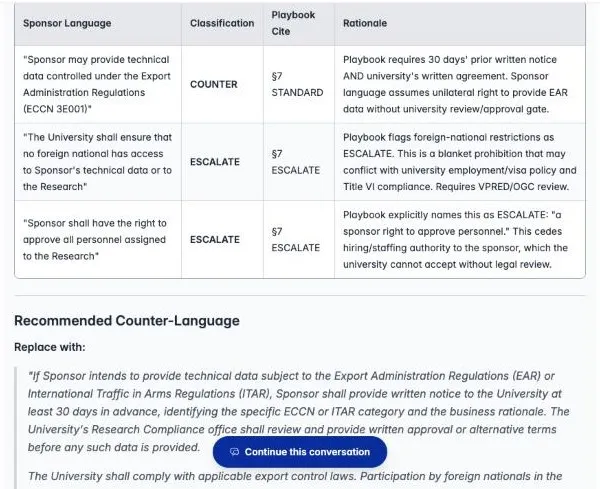
Her first, longer question returned the wrong playbook sections. The short, keyword-rich version above found §7 directly. See Ask good questions.
Tom (tech transfer) attaches the v2 redline to his conversation and asks:
Focus on Article 7 (IP): 1) quote exactly what Cascadia deleted and what they inserted; 2) classify against playbook §1 and draft our response language; 3) are other articles touching IP indirectly?
Because the redline is an attachment, the assistant quotes the deletion and the insertion separately and accurately. It also flags Articles 5, 6, 8 and 12 as touching IP.
Jordan (post-award) asks the assistant to compare cash exposure at month 12 under both payment terms, using the Calculator tool.
Dr. Sokolova (PI, viewer) asks whether the publication clause would block her student’s thesis. The assistant explains that sponsor approval of publications is non-negotiable under the playbook, and drafts a carve-out for theses.
Each of them then opens Share › Project members, and the project page’s Shared with the project list fills up with the team’s analyses.
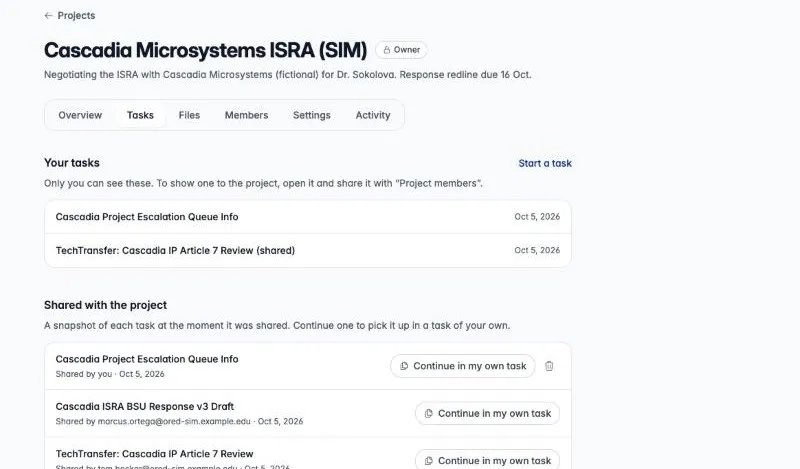
Step 3: Marcus drafts the response redline
Section titled “Step 3: Marcus drafts the response redline”Marcus reads the shared conversations, starts a fresh conversation, attaches Cascadia’s v2, and pastes the team’s positions:
Team positions to apply: Art. 3 restore 50/50, net 30, no acceptance contingency; Art. 5 three years, strike the student acknowledgement; Art. 6 30-day review + 60-day patent delay, theses excluded; Art. 7 restore University ownership and the 6-month option; Art. 8 30 days’ notice + written agreement, strike the foreign-national bar and personnel approval; Art. 10 restore the Idaho Tort Claims Act language; Art. 12 strike the performance warranty; Art. 14 restore Idaho law and Ada County venue.
Create “Cascadia ISRA – BSU Response v3.docx” showing our changes as tracked changes (author “Boise State OSP”) with a short italic note under each article citing the playbook section.
The assistant produces a Word document with 9 insertions and 11 deletions as genuine tracked changes, ready for Review › Accept/Reject in Word.
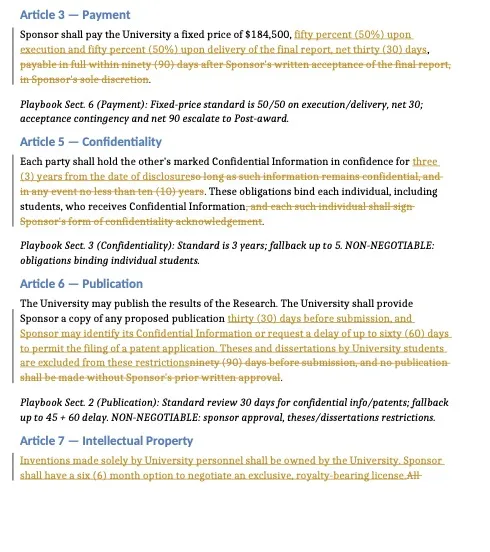
Marcus’s review still catches one miss. In Article 5 the assistant struck the student acknowledgement but left “These obligations bind each individual, including students”. He fixes it in Word and shares his conversation.
The generated file belongs to Marcus’s conversation, so teammates can’t open it from the shared snapshot. In the test run he added v3 to the project’s Files so they could. Because Files flattened tracked changes at the time, the assistant later read v3’s Article 10 as “already matches our standard, no escalation needed”, when Cascadia had in fact demanded university indemnification.
(Fixed since: with tracked changes written out as [deleted: …] and
[inserted: …], v3’s Article 10 now reads as the university’s text inserted
and Cascadia’s indemnification demand deleted. Adding the response redline to
Files, named as the university’s proposal, is now a sound way to share it.)
Step 4: Escalations and a hand-off
Section titled “Step 4: Escalations and a hand-off”Two days before the deadline, Dana goes on leave. She opens Members and chooses Make owner for Alex Morgan, the associate VP. Alex is notified, and Dana stays on as an editor.
Alex starts a conversation:
I’m now the project owner. Give me my escalation queue for Cascadia: every item that needs VPRED/OGC or my sign-off, who raised it, and the proposed University position. Also tell me what you could NOT see, so I know how complete this is.
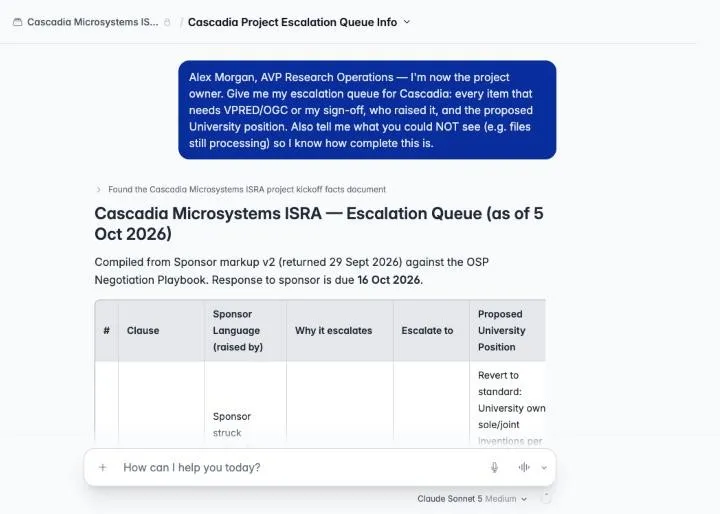
The last sentence of that prompt is worth copying. The assistant listed which articles it had and hadn’t seen, which told Alex what to double-check.
Step 5: Wrapping up
Section titled “Step 5: Wrapping up”- Tom finishes the IP review and leaves the project. His shared conversation stays listed for the team.
- After Cascadia signs, Alex archives the project. It stays readable, with its files, history and shared conversations, but nobody can start new work in it. If the sponsor comes back with an amendment, Alex restores it.
What made it work
Section titled “What made it work”- One brief, many reviewers. The instructions gave every member the same reviewer, with the same format and citations.
- Owners for each clause, recorded in memory. The assistant routed issues to the right office without being told each time.
- Private conversations, explicit sharing. People worked in parallel and published finished analyses.
- Redlines read as redlines. Tom’s attached redline let the assistant quote each deletion and insertion. Since the fix, a redline in Files does the same.
- A human pass before anything is saved or sent. The assistant drafted fast and well, and still made mistakes a reviewer caught.
Prompts you can reuse
Section titled “Prompts you can reuse”| Goal | Prompt |
|---|---|
| Clause review | “Review Article N of the attached redline against playbook §X. Quote the sponsor’s change, classify it ACCEPT / COUNTER / ESCALATE, and give paste-ready language.” |
| Cross-clause sweep | “Which other articles in this redline touch [IP / confidentiality / export control] indirectly?” |
| Team status | “Summarize everything recorded in project memory about this negotiation: decisions, open issues, owners.” |
| Record a decision | “Record in project memory: [decision].” |
| Response document | “Create a Word document of our response with tracked changes (author ‘[office]’) and a note under each article citing the playbook section.” |
| Completeness check | “…and tell me what you could NOT see, so I know how complete this is.” |